Properties and units
You can manage the range of properties for the various objects with the Property Catalog (HOME > Settings > Catalogs > Property Catalog). Closely related to this is the Display Units form, that allows you to choose the units property values are displayed in, throughout the application.
The relationship between properties, Property Catalog and Display Units
Objects (such as grids, tri-meshes, polyline sets, but also wellbores and markers) can have a range of properties, such as porosity, permeability, depth or smoothness.
A Property Catalog is used in the application to give a logical meaning to an object property and to attach properties with default values to an object.
You can specify property values in the user interface in the units you wish, such as feet and meters for depth values, by specifying the Display Units.
If the units are specified in a file, these units will be used to import the data (for example, if the file header indicates depth values in feet, then the values will be imported as feet). If the units are not specified in a file, you can specify the appropriate units (for example, if you know that the data in the file is in feet, you must select feet).
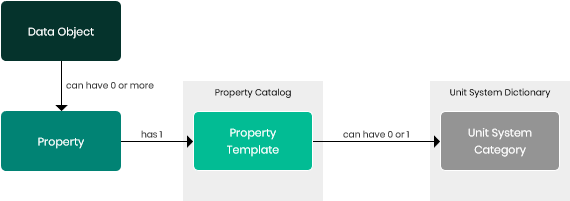
The connection between a property, the Property Catalog, and the Display Units click to enlarge
The properties, Property Catalog, and display units are interrelated:
- A property always has a property template (from the Property Catalog) associated with it to give it a logical meaning.
- A property template can have a quantity (from the Unit System Dictionary) associated with it to specify the corresponding property units.
Example
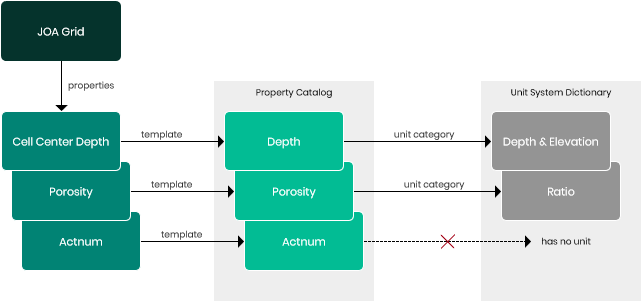
The connection of three grid properties (Cell Center Depth, Porosity and Actnum) to corresponding property templates and the Unit System click to enlarge
A JewelGrid has a property ‘Cell Center Depth’. This property has a depth value for every cell in this grid. A property template has been associated with this property: in this case the ‘Depth’ property template.
The quantity ‘Depth & Elevation’ has been associated with this template to give the values a real meaning: in this case, Depth & Elevation. A unit quantity has also been associated with this unit category: for Depth & Elevation, the Length quantity. In this quantity, various length units are available, such as meter, feet or inch. Finally, depending on your unit setting, values of this category will be displayed in the appropriate unit.